Linked Reactions Table for General Footings |
  
|
Linked Reactions Table for General Footings |
|
Last revised: Thursday, January 29, 2026 at 02:34 PM
The Linked Reactions table displays all support reactions and their associated link settings that are linked to the active general footing calculation.
NOTE: The sign conventions shown in this table are relative to the footing's local coordinate system. All required sign conversions are handled automatically based on the specified Link Settings and will account for differences in local axis conventions. It can be helpful to compare the values in this table with those in the Base Reaction Table to see how orientation settings affect how the reactions are applied to the footing.
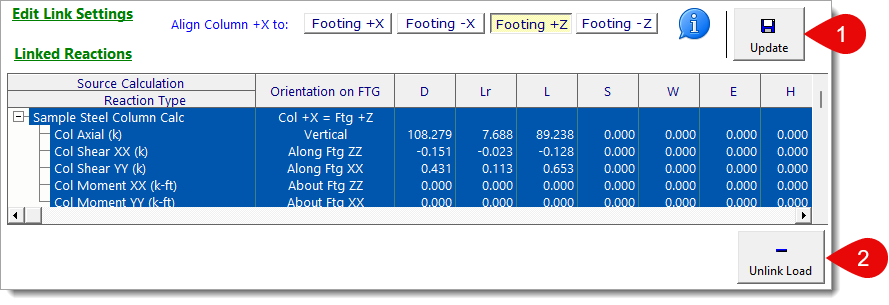
1) To Edit a Linked Load: Select the existing linked load from the table. The Edit Link Settings section will populate with the existing link settings. Modify the settings as desired and click the Update button. You can also use the Info button to edit the existing linked load as well.
NOTE: Column base reactions are always linked in full. This means that when you link a column reaction to a General Footing, all components (axial, shear, and moment) are included. When you select an existing linked reaction, all associated components are selected together.
2) To Delete a Linked Load: Select a linked load from the table and click the Unlink Load button.
NOTE: The General Footing module supports only one linked load at a time. If the Add Link Load button is disabled, this usually means a linked load is already present. In that case, you'll need to select and remove the existing linked load before adding a new one.
 <
<