Linked Reactions Table for Columns |
  
|
Linked Reactions Table for Columns |
|
Last revised: Thursday, January 29, 2026 at 02:34 PM
The Linked Reactions table displays all support reactions and their associated link settings that are linked to the active column calculation.
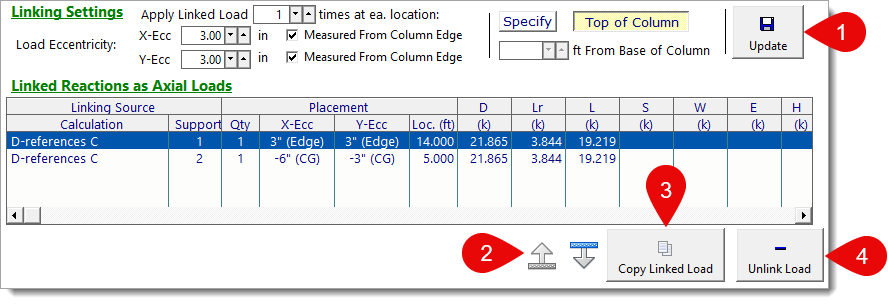
1) To Edit a Linked Load: Select a linked load from the table. The Edit Link Settings section will populate with the existing link settings. Modify the settings as desired and click the Update button.
2) To Reorganize the Display Order of Linked Loads: Select a linked load from the table and click the Shift Up or Shift Down buttons.
3) To Duplicate a Linked Load: Select a linked load from the table and click the Copy Linked Load button.
4) To Delete a Linked Load: Select a linked load from the table and click the Unlink Load button.
 <
<