Program Settings |
  
|
Program Settings |
|
Last revised: Tuesday, June 9, 2026 at 12:48 PM
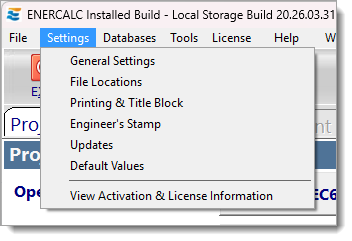
Most of these items are covered in another section of this help document. Please click on an item in the list below to jump to that section.
General Settings: Defines settings that are typical to the overall installation and to all Project Files such as backup file creation and behavior of the Project Manager.
File Locations: Specifies the default file locations for Project Files and databases.
Printing & Title Block: Provides the ability for the user to define the look of their title block.
Engineer's Stamp: Allows the user to upload a graphic image of their Professional Engineer's stamp for inclusion on printed reports.
Updates: Allows control over behavior of web update system and direct access to the update installation program on the web.
Default Values: Only accessible when a calculation module is open. Provides control over the default values used for that specific calculation module.
Default Governing Code: Allows the user to select the default governing code for all NEW project files. Note: This is different than changing the governing code for the current Project File or changing load combination sets.
View Activation & License Information: Provides access to user information.
 <
<