Linking Reactions from Beams |
  
|
Linking Reactions from Beams |
|
Last revised: Monday, March 23, 2026 at 11:03 AM
When linking reactions from beam calculations, there are three main components to this portion of the window:
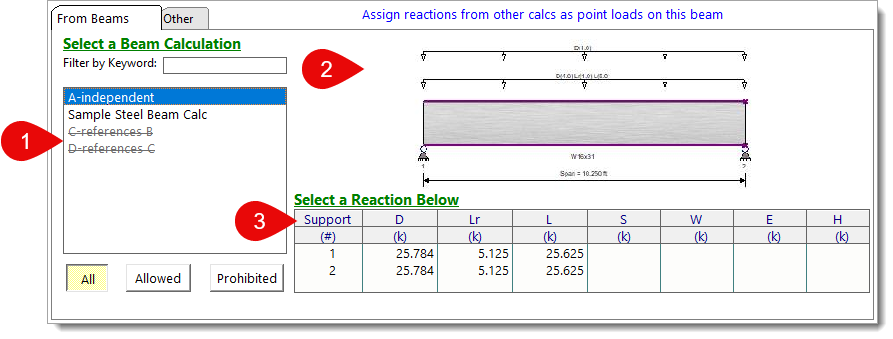
1) Beam Calculation Table: Displays a list of beam calculations within the active project file. Creating links to calculations that are dependent on the active beam calculation is prohibited to avoid circular references. Prohibited calculations are included in the table for reference but are marked with strikethrough font. Buttons at the bottom of the table allow for the inclusion or exclusion of prohibited calculations from view.
TIP: For projects with many calculations, use the Filter by Keyword text box to narrow down the list. Only calculations with names that contain your keyword will be shown. To make filtering even more effective, consider giving your calculations unique names or prepending them with a key identifier (such as "B1", "B2", etc.). This can help you quickly recognize and differentiate calculations at a glance.
2) Reference Sketch: A visual reference of the currently selected beam.
3) Reaction Table: Displays the reactions by load case at each support of the selected beam. Reactions for D, Lr, L, S, and H are shown at the service level, while W and E are presented at the strength level. It is important to note that these reactions are already formatted for direct incorporation into further calculations, ensuring there is no double-factoring of the referenced reaction forces.
NOTE: Since loads are linked on a load case basis, any live load reductions which have been manually accounted for on an upstream live load will carry through to downstream calculations. For example, if a 20 psf roof live load (unreduced) was manually input on a roof joist at 16 psf (reduced), the resulting "L Only" reaction would be based on 16 psf. The associated linked reaction on the supporting girder would also be based on the manually inputted 16 psf.
NOTE: Transfer of beam end moment reactions to the footing is not currently supported. Only forces will be transferred to the supporting element via Load Linking.
Once you've selected the reaction you'd like to link to the current calculation, move on to Edit Link Settings.
 <
<